Practice · Consumer electronics
BOA Ecommerce Gadgets Store
A practice storefront for a gadget shop in Nigeria: browse by category, narrow the catalogue with filters and sorting, and build a cart that keeps its quantities, savings and totals right — in naira, on a phone or a desktop.
Don’t see any products on the live site? This practice project ran on Supabase’s free plan, which pauses the database after 7 days without activity — so the catalogue may be asleep, not broken.
Contents · Overview
Overview
BOA Gadgets is a practice project: an online shop for phones, audio, laptops and accessories, written for a Nigerian audience — prices in naira, delivery “nationwide”. There is no client and nothing is sold; the point was to build the parts every store needs and make them hold up on a phone.
It is a React single-page app. The home page reads its slides, picks and featured products from a Supabase database; All Products filters and sorts a catalogue that ships with the code; the cart lives in the browser.
Challenge & goals
“Your trusted source for premium tech gadgets in Nigeria. We bring you the latest innovations with reliable delivery nationwide.”
The brief was short: a modern, fully responsive storefront for consumer electronics. The work is in the unglamorous details — filters that combine sensibly, naira prices formatted properly, quantities that can’t drop below one, and totals that stay right as things come and go.
goals, from the project brief
- A cart with real state: quantities, savings and a running total.
- Product filtering that narrows the catalogue as you choose.
- Grids that reflow from one column on a phone to four on a wide screen.
- A light theme with a dark one a tap away.
The journey the build had to support
- Home
- Category or All Products
- Filter & sort — Search, price range, category, brand; five sort orders.
- Add to cart
- Cart summary — Payment was out of scope: “Proceed to Checkout” is a placeholder.
Information architecture
The shop is organised the way gadget stores usually are: by category, by brand and by deal, all leading to a product page and the cart. Help pages (delivery, returns, warranty, FAQ) and the account sit beside the shopping path, not in it.
Behind the storefront, the code also has an admin area. Its pages manage the things the home page reads from the database — hero slides, top picks, featured products — as well as deals, promo codes, orders and customers.
Sitemap (from the app’s router)
- Admin — Edits the home page’s slides and picks. 12 views: dashboard, products, categories, hero carousel, featured products, top picks, deals, promo codes, orders, customers, reports, admin users.
- Home
- Categories — All categories, and one page per category.
- All Products — Search, filters, sort, grid or list, 12 products per page.
- Deals — A deals page and one per deal type.
- Shop by brand
- Account — Sign-in, profile and order tracking.
- Help pages — About, contact, FAQ, delivery, returns and warranty.
- Product page
- Cart
Wireframes: filtering
all products
Narrow first, then browse.
Filters stay out of the way until asked for: Show Filters opens a panel with a search box, a price range (₦0 to ₦2,000,000 in ₦50,000 steps), and checkboxes for six categories and eight brands. Sorting sits beside it.
Within a group, ticks widen the results (Apple or Sony); across groups they narrow them (audio, and under ₦300,000). Every change jumps back to page one, and the heading keeps count — “Showing 2 of 6 products”.
On wide screens the panel is a column beside the grid; below that it stacks above the results, and the grid steps down from four columns to one. If nothing matches, the page says so — “No products found. Try adjusting your filters or search terms” — with a button to clear them.
Visual design & system
Neutral ink and slate carry the page; colour is saved for selling moments — a blue accent, red for deals, a purple seasonal banner. The theme is written as HSL tokens (background, foreground, primary, accent) with a dark set alongside, and the logo swaps to a light version in dark mode. The choice is remembered between visits.
Today’s Top Picks · ₦149,999
Everything: headings, prices and interface, weights 400–700
Key screens
The home page sells before it lists: a slide, a few picks and two offers above the fold, then categories, deals and the collection further down. Some of it is managed content from the database; some is written into the page.
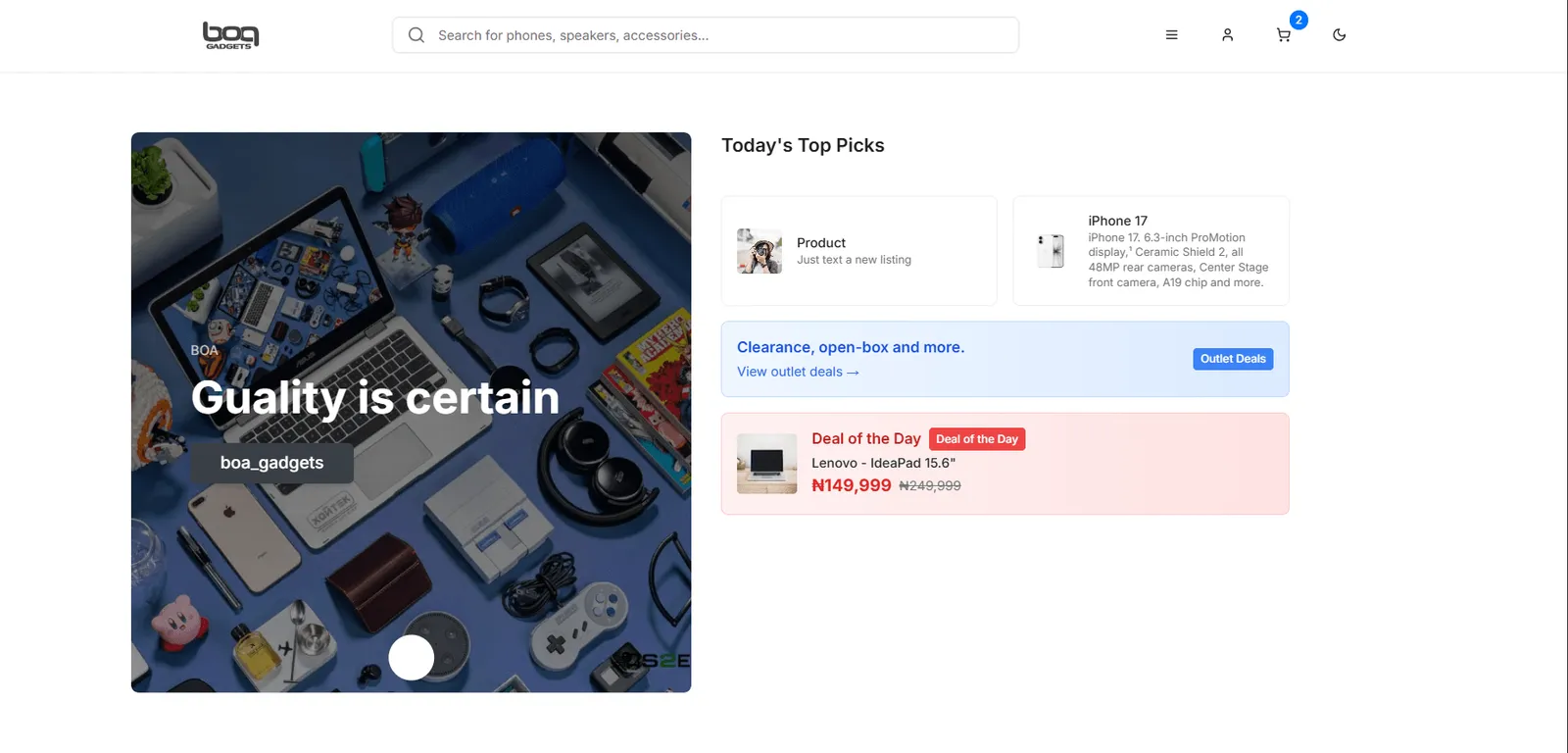
- 1Search gets the widest slot
The usual pattern for shops where people arrive looking for a model. In this build the header field is visual only; search works on All Products.
- 2Cart count
The badge counts items, not lines: two of the same headphones show as 2.
- 3Hero carousel
Slides are rows in the database, edited from the admin area’s Hero Carousel page.
- 4Today’s Top Picks
Also read from the database, so picks can change without a new deploy.
- 5Deal of the Day
Written into the page, so it shows even when the database doesn’t answer — as it did in November 2026.
The cart
The cart is the part of the brief with real state to get right. It was tried end to end on the live site; the numbers below are from that run.
Start empty
An empty cart says so — “Your cart is empty. Discover amazing products and start shopping today!” — with one button back to the shop, not a blank page.
Cart states
- Empty cart — “Your cart is empty”, with a Continue Shopping button back home.
- Add to cart — A new product goes in with quantity 1; the same product again adds 1 to its line.
- One line per product — Saved to localStorage on every change, so the cart survives a reload.
- Change quantity or remove — Minus is disabled at 1; the bin removes the line.
- Lines left?
- Order summary — Subtotal, savings, free shipping, 5% tax, total. Checkout is not wired up yet.
Add, or add one more
Add to Cart puts a product in with a quantity of 1 and confirms with a toast: “Sony WH-1000XM5 has been added to your cart.” Adding the same product again raises that line to 2 rather than making a second line.
Cart states
- Empty cart — “Your cart is empty”, with a Continue Shopping button back home.
- Add to cart — A new product goes in with quantity 1; the same product again adds 1 to its line.
- One line per product — Saved to localStorage on every change, so the cart survives a reload.
- Change quantity or remove — Minus is disabled at 1; the bin removes the line.
- Lines left?
- Order summary — Subtotal, savings, free shipping, 5% tax, total. Checkout is not wired up yet.
Adjust
Each line has a − / + stepper and a bin. Minus stops at 1, so removing is always a deliberate, separate action. The header badge counts items (two headphones show 2); the cart heading counts lines (“1 item”).
Cart states
- Empty cart — “Your cart is empty”, with a Continue Shopping button back home.
- Add to cart — A new product goes in with quantity 1; the same product again adds 1 to its line.
- One line per product — Saved to localStorage on every change, so the cart survives a reload.
- Change quantity or remove — Minus is disabled at 1; the bin removes the line.
- Lines left?
- Order summary — Subtotal, savings, free shipping, 5% tax, total. Checkout is not wired up yet.
Read the total
The summary recalculates on every change: subtotal, savings against the original prices, free shipping, 5% tax and the total. Two Sony WH-1000XM5 at ₦299,000 came to ₦598,000, saved ₦200,000, and totalled ₦627,900 with tax.
Cart states
- Empty cart — “Your cart is empty”, with a Continue Shopping button back home.
- Add to cart — A new product goes in with quantity 1; the same product again adds 1 to its line.
- One line per product — Saved to localStorage on every change, so the cart survives a reload.
- Change quantity or remove — Minus is disabled at 1; the bin removes the line.
- Lines left?
- Order summary — Subtotal, savings, free shipping, 5% tax, total. Checkout is not wired up yet.
Cart states
- Empty cart — “Your cart is empty”, with a Continue Shopping button back home.
- Add to cart — A new product goes in with quantity 1; the same product again adds 1 to its line.
- One line per product — Saved to localStorage on every change, so the cart survives a reload.
- Change quantity or remove — Minus is disabled at 1; the bin removes the line.
- Lines left?
- Order summary — Subtotal, savings, free shipping, 5% tax, total. Checkout is not wired up yet.
Cart states
- Empty cart — “Your cart is empty”, with a Continue Shopping button back home.
- Add to cart — A new product goes in with quantity 1; the same product again adds 1 to its line.
- One line per product — Saved to localStorage on every change, so the cart survives a reload.
- Change quantity or remove — Minus is disabled at 1; the bin removes the line.
- Lines left?
- Order summary — Subtotal, savings, free shipping, 5% tax, total. Checkout is not wired up yet.
Cart states
- Empty cart — “Your cart is empty”, with a Continue Shopping button back home.
- Add to cart — A new product goes in with quantity 1; the same product again adds 1 to its line.
- One line per product — Saved to localStorage on every change, so the cart survives a reload.
- Change quantity or remove — Minus is disabled at 1; the bin removes the line.
- Lines left?
- Order summary — Subtotal, savings, free shipping, 5% tax, total. Checkout is not wired up yet.
Cart states
- Empty cart — “Your cart is empty”, with a Continue Shopping button back home.
- Add to cart — A new product goes in with quantity 1; the same product again adds 1 to its line.
- One line per product — Saved to localStorage on every change, so the cart survives a reload.
- Change quantity or remove — Minus is disabled at 1; the bin removes the line.
- Lines left?
- Order summary — Subtotal, savings, free shipping, 5% tax, total. Checkout is not wired up yet.
Build
Where each part gets its data
- Visitor’s browser
- Netlify — Serves the built files. There is no single-page-app fallback rule, so a sub-route opened directly gets Netlify’s “Page not found”.
- React app — React Router handles every route in the browser once the app has loaded.
- Supabase — Read by the home page: hero slides, top picks, featured products, the collection. Also has tables for orders, profiles, deals and promo codes.
- Product list in the code — All Products filters six products that ship with the bundle.
- localStorage — The cart and the light/dark choice.
The cart is a React context: an array of lines, saved to localStorage on every change and read back on load. Adding, removing and changing a quantity are three small functions, and setting a quantity to zero removes the line, so the data can never hold an empty one.
Filtering and sorting run in one memoised pass over the product list, recalculated only when the search, ticks, price range or sort order change:
const visible = useMemo(() => {
  const list = PRODUCTS.filter((p) => {
    const matchesSearch = p.name.toLowerCase().includes(search.toLowerCase())
      || p.brand.toLowerCase().includes(search.toLowerCase());
    const inCategory = categories.length === 0 || categories.includes(p.category);
    const inBrand = brands.length === 0 || brands.includes(p.brand);
    const inPrice = p.price >= price[0] && p.price <= price[1];
    return matchesSearch && inCategory && inBrand && inPrice;
  });
  return list.sort((a, b) => {
    switch (sort) {
      case 'price-low': return a.price - b.price;
      case 'price-high': return b.price - a.price;
      case 'rating': return b.rating - a.rating;
      case 'newest': return b.id - a.id;
      default: return a.name.localeCompare(b.name);
    }
  });
}, [search, categories, brands, price, sort]);Outcome & learnings
november 2026
What still stands.
The site is still live, but the home page’s data requests fail: the hero, Top Picks, Hottest Deals and Collection sections fall back to their empty states (“No products available at the moment”) and an error toast says “Failed to load products”.
Everything written into the page — header, categories, Deal of the Day, the holiday deals, footer — still renders, and All Products and the cart still work, because neither depends on the database.
what we learned
- Keep one source for the catalogue. The home page reads products from the database while All Products filters a list in the code — the same Galaxy S24 Ultra is ₦1,200,000 in the holiday banner and ₦1,099,000 on All Products.
- Design empty and error states early. When the data stopped, they were what visitors saw, and they kept the page readable.
- A single-page app on static hosting needs a fallback rule. Opening /cart or /products directly returns Netlify’s “Page not found”; the same pages work when reached from the home page.
- Icon-only buttons need names. The cart’s −, + and bin buttons have no accessible label yet.
open items
- Wire “Proceed to Checkout” to a payment provider (it’s a placeholder).
- Connect the header search box to the catalogue.
- Add a redirect rule so deep links like /cart open the app.
- Point the home page and All Products at the same product data.
- Label the cart’s icon buttons for screen readers.