Client · Healthcare
Triverge Healthcare
A website for an elderly-care centre in Ibadan that does more than describe care: families book a consultation in four steps or ask an AI care assistant, trainees enrol and pay for caregiver training, and staff run it all from one dashboard.
Contents · Overview
Overview
Triverge Healthcare provides elderly care in Ibadan — nursing, dementia care, rehabilitation, therapy and respite — at home or at the Triverge Geriatric Centre, which the site lists as open 24/7. Its training academy runs the Home Care Assistant Programme (HCAP) for new caregivers.
The website is built around one action. Book Consultation sits in the header of every page, and the home page opens with a free 30-minute consultation. Behind the public pages is a private dashboard where the Triverge team manages bookings, trainees, blog posts and subscribers.
Challenge
“Triverge Healthcare is upgrading from a static informational website to a dynamic web application.”
The old site could only describe Triverge. The new one had to do work: take bookings, answer questions at any hour, enrol and charge trainees, and let staff run all of it without a developer.
It also had two audiences with different questions. A family choosing care wants to know what Triverge offers, whether it can be trusted and how to talk to someone. A would-be caregiver wants to know what the course teaches, who can apply and how to enrol.
Both journeys had to work as well on a phone as on a desktop.
Goals
goals, from the prd
Booking — “streamline appointment setting”: pick a service, a date and a time, leave your details, done.
Answers at any hour — “instant, accurate answers to visitor questions 24/7”, drawn only from Triverge’s own information, with hard questions handed back to a person.
Enrolment — “capture student data and process fees” for HCAP, paid online through Paystack.
A back office — staff manage appointments, students, posts and subscribers in a private dashboard, not in code.
Planning
The platform was planned on a Miro board, Triverge Healthcare Digital Platform: the requirements as a mind map, two booking flowcharts and a sequence diagram across eleven lanes. It is linked rather than embedded here, because Miro boards load empty for visitors who aren’t signed in — so the next section redraws its diagrams and sets them against what was built.
Three documents also sat in the repository for the whole build: the product requirements (version 2.0, approved for development on 8 January 2026), a visual style guide, and an implementation task list in five phases. Each task had acceptance criteria, and the list was kept honest — items that were only partly done, or done differently, say so.
From documents to build
- Miro board — The requirements mapped out: pages, booking, chatbot, enrolment, dashboard, database tables and integrations, with the booking flows and a sequence diagram.
- PRD v2.0 — Three user roles (guest, student, admin), the page hierarchy, booking, chatbot, enrolment, the admin dashboard and the database tables.
- Visual style guide — “Modern Compassion”: five colours, Manrope and Newsreader, 20px corners, Solar icons.
- Task list · 5 phases — Foundation, public site, smart integrations, admin dashboard, then QA and deployment.
- Next.js build — First commit 12 January 2026.
From board to build
The board does three jobs. A mind map spreads the requirements out — every page and section, the booking engine, the chatbot, enrolment and payments, the admin dashboard, the database tables and the four integrations. Two flowcharts walk a family from the home page to a booked consultation. And a sequence diagram runs the same stories across eleven lanes, from Guest, Student and Admin on the left to the Database, Google Calendar and WhatsApp on the right.
Its most useful trace is the booking flow, because the build changed it:
Booking, as drawn on the board
- Visits the website
- Views the home page
- Clicks “Book Consultation” — Shipped: the button sits in the header of every page.
- Selects date and time — Shipped as step 2 of the wizard, with six fixed slots.
- Choose booking method — Not shipped: families call or WhatsApp from “Let’s support your family” instead of choosing inside the wizard.
- Discuss on WhatsApp — The board’s option A: a redirect with a pre-filled message.
- Fills the intake form — The board’s option B. Shipped as steps 1, 3 and 4 of the wizard: service, details, confirm.
- Confirmation sent — Shipped as the confirmation screen; the promised SMS isn’t sent yet.
- Saved to the database — Shipped: bookings live in Supabase and show in the dashboard.
- Google Calendar event — Not shipped: the dashboard’s own calendar replaced it.
- Consultation booked
on the board, in the build
- The page tree — home with a hero booking button, services grid, features and testimonials; services pages; the HCAP page with its enrolment form; blog index and posts; contact with maps.
- The AI chatbot: “powered by Gemini 2.5 Flash”, context-aware, as a floating button — shipped as Alma.
- Student enrolment with Paystack, the enrolment form and transaction records.
- The admin dashboard: statistics, an appointment manager, a student manager, and content management for posts, testimonials and newsletter subscribers.
- The database tables the board lists — appointments, students, blog posts, testimonials, newsletter subscribers — plus a search index, built as the Ctrl+K palette.
- The stack as the board names it: Next.js, Supabase, Paystack, WhatsApp deep links, and Google Antigravity as the agentic IDE.
on the board, changed in the build
- Google Calendar synchronisation, drawn in all three diagrams — the dashboard’s own calendar replaced it.
- The “choose booking method” fork inside the booking flow — WhatsApp became a floating action and a line on the support section instead.
- The confirmation system’s SMS — the screen ships, the message doesn’t yet.
Information architecture & flows
The build kept the PRD’s page hierarchy and added three routes: a page for the Ibadan centre, /book for the booking wizard, and /join for caregivers applying to work with Triverge. Every page shares the header (search and Book Consultation), the footer and the floating AI Care-Assist button.
Sitemap (main routes)
- Home
- Ibadan centre
- About Us — Mission, values and the team.
- Services — One index, plus a page per service at /services/[slug].
- HCAP Training
- Blog — Posts are written by staff in the admin dashboard.
- Contact — With a short FAQ.
- Service page
- Enrol & pay — Email first, then the fee through Paystack, then the enrolment form.
- Book consultation — Reached from the header, the hero card and every service page.
home, top to bottom
Hero and consultation card → the Ibadan centre → care at every stage → why families choose Triverge → the training academy → “Let’s support your family” → testimonials → health-tips newsletter → footer. Care comes first; training gets its own colour block halfway down, so a trainee can find it without it getting in a family’s way.
The booking wizard is the centre of the site. It is one card with a progress bar that fills a quarter per step, and every step has a single obvious way forward. (The schematics below are drawn from the built wizard, not design artefacts.)
1 · Select a service
Four large cards: Home Care, Rehabilitation, Respite Care and Free Consultation, each with one line of explanation. Choosing a card moves straight on — there is no Next button to look for.
2 · Choose date & time
A calendar that won’t offer past days, beside six time slots from 9 am to 3 pm. Next stays disabled until both a day and a time are picked.
3 · Your details
Only a name and a phone number are required; email and notes are optional. Fewer fields means less for a worried relative to get wrong.
4 · Confirmed
The request is saved as pending and a notification email goes out straight away. In the dashboard, staff update its status and can attach a Zoom link, which is emailed to the family if they left an address.
Visual design & system
“The design blends the clean, trust-building precision of a medical platform with the warmth of a community center.”
The style guide allows exactly five colours and gets depth from their opacities rather than adding new ones. Cards and photos take a 20px radius, primary buttons are blue pills, icons come from the Solar set, and key phrases get a hand-drawn teal underline — the one under “Elderly Care” in the hero.
We Are Your One-Stop Elderly Care Provider
Headings, navigation and buttons
Every older adult deserves care that respects their story, their schedule, and their preferences.
Body copy; the italic carries quotes and small accents
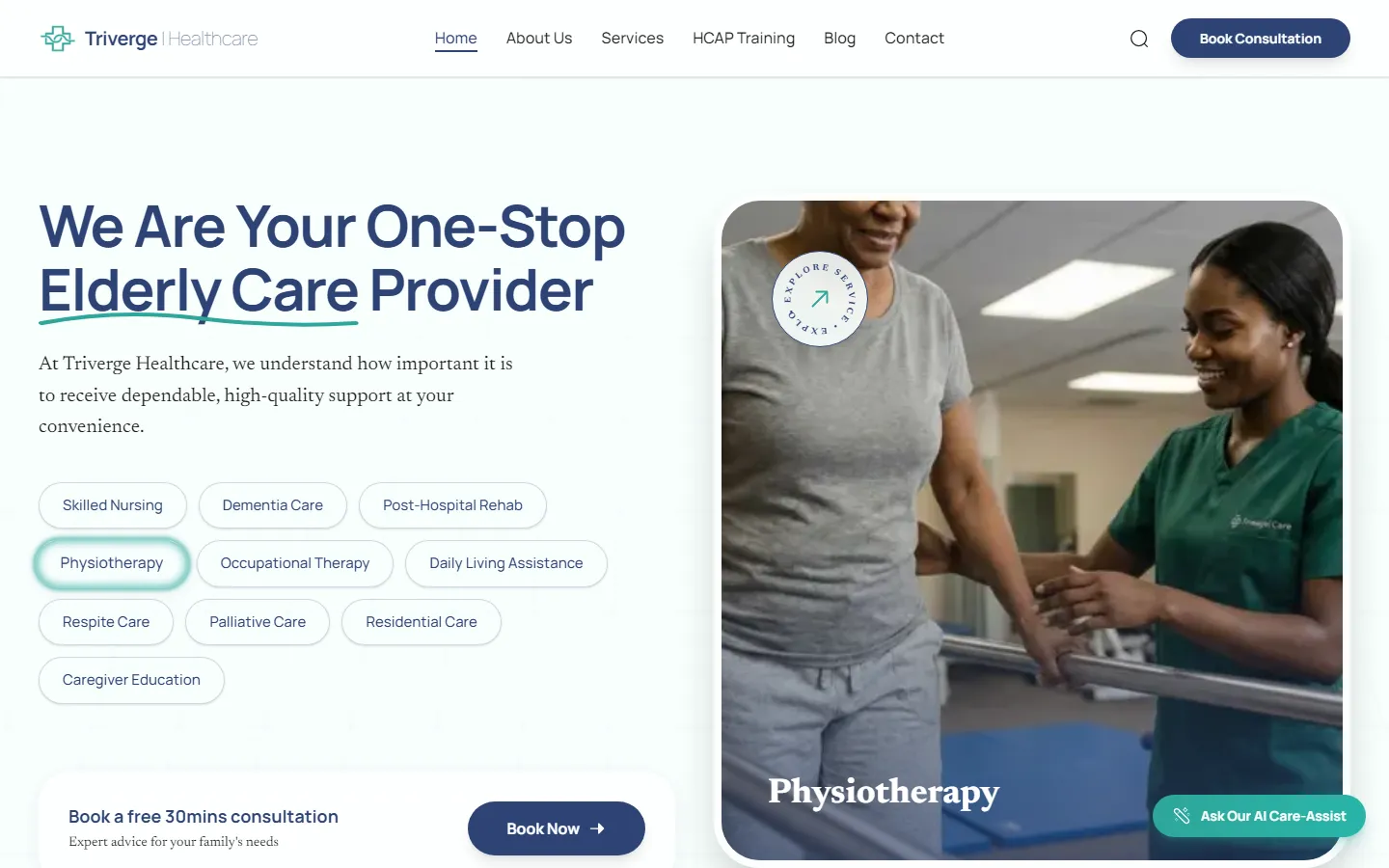
- 1Book Consultation, always
The header button is on every page and opens the four-step booking wizard.
- 2Search
Opens a command palette (Ctrl+K) that searches pages, services and blog posts as you type.
- 3A hand-drawn underline
The teal “doodle” the style guide uses to mark the phrase that matters.
- 4Service chips
Ten services as pills. They light up in turn every three seconds and swap the photo; hovering one pauses the cycle on that service.
- 5Free 30-minute consultation
The offer in plain words, with its own Book Now button.
- 6Ask Our AI Care-Assist
Opens Alma, the chat assistant, from any page.
Body text is charcoal on porcelain at about 16:1, and the blue buttons carry their text at about 9.6:1. White on Healing Teal is the weak pair at about 3:1 — fine for large type, too low for the small labels on teal buttons (see Outcome).
Key screens
Services
One page for every service: a short intro and the booking button, then a card per service with one plain sentence each — “Help with bathing, dressing, feeding, hygiene, and mobility.” A bar asks “Not sure which service is right?” and offers a consultation.
HCAP Training
The training page switches to deep blue to mark a different audience. It lists nine things a trainee learns, six stages from classroom to job placement, and who can apply: “No medical background required”. Enrolling takes an email, the fee through Paystack, then a form.
About
Who Triverge is, its mission, and three values — comfort, dignity, expertise, the same words as the footer’s sign-off — then the team, each with their role.
Blog
Health tips with a featured article and its author, category filters and a newsletter sign-up. Staff write and publish posts from the dashboard, so the page stays current without a developer.
Build & handoff
The site is a Next.js 16 app (React 19, Tailwind CSS 4, Framer Motion) deployed on Netlify and built in Google Antigravity, the agentic IDE the PRD chose. Supabase holds the data — appointments, students, caregiver applications, blog posts, subscribers — and handles staff sign-in.
Nothing day-to-day needs a developer. The dashboard covers bookings, a calendar, students, caregivers, the blog, the newsletter, notifications, audit logs, users and settings, and a scheduled Netlify function writes a summary of each day’s activity and clears records older than four days.
How the pieces talk
- Family or trainee
- Triverge staff
- Next.js on Netlify — Public pages, the booking wizard, search and the chat widget.
- Admin dashboard — Signed-in staff only.
- Gemini 2.5 Flash Lite — Alma, the AI Care-Assist.
- Paystack — The HCAP fee; the reference is checked on the server.
- Supabase — Postgres tables, staff auth, and storage for blog and caregiver uploads.
- Resend email — New-booking alerts, and Zoom links for families.
alma, the ai care-assist
Plain words, and a phone number when it matters.
The floating button opens Alma, a chat assistant on Gemini 2.5 Flash Lite. Her instructions hold Triverge’s services, the HCAP course and basic care advice, written for Nigerian families. Anything serious — a medical emergency, a question about price — is handed to the phone line.
**Tone and Language**

* **Style:** Use Grade 7 English. Keep sentences short
  and words easy to understand.
* **Cultural Context:** Speak in a way that is friendly
  to the African market, especially Nigeria. Use
respectful terms like "Papa" or "Mama" for elders.-
Requirements approved
PRD version 2.0, “approved for development”.
-
First commit
The Next.js app and its design libraries set up.
-
Public pages
HCAP, About and Contact pages, and branding refinements.
-
Booking and dashboard
The booking wizard, the admin dashboard and staff sign-in.
-
Light mode only
Dark mode, planned in the style guide as a secondary theme, was removed; the dashboard and wizard were connected to the database.
-
Enrolment and content
HCAP enrolment with Paystack; blog, newsletter and user management in the dashboard.
-
Alma and search
The AI Care-Assist and the Ctrl+K command palette.
-
Zoom and hiring
Zoom links on bookings, and a Join Our Team application for caregivers.
-
Daily audit log
A scheduled function that summarises each day’s activity.
Outcome & learnings
The site is live at trivergecare.com with the booking wizard, Alma, HCAP enrolment and the dashboard all running. Because the task list recorded where the build moved away from the plan, those changes are easy to see:
in the prd, changed in the build
- Google Calendar sync — bookings live in Supabase and the dashboard’s own calendar instead.
- A “discuss on WhatsApp or book here” choice after picking a slot — families call or WhatsApp from “Let’s support your family” instead.
- An interactive WebGL hero — replaced by the cycling service chips.
- Dark mode — removed in February to keep one, light theme.
what we would do next
Three small things, all found reading the build back. The confirmation screen promises “a confirmation SMS”, but the build sends no SMS — the copy or the feature should catch up. The six time slots are fixed, and only the dashboard calendar knows which are taken; feeding that back into the wizard would let it offer only the slots that are still free. And the small white labels on Healing Teal measure about 3:1 — moving those buttons to Deep Teal would bring them to roughly 6:1.