Client · Fintech & crypto
Candleweb
Trading infrastructure for people who build their own bots — plus CandleAI, a no-code trading agent for everyone else, and an Academy for people who want to learn first. The money never leaves the user’s own exchange account.
Contents · Overview
Overview
Candleweb describes itself as infrastructure for agentic trading. A user’s bot — an n8n workflow, a Make scenario, a script — makes the call; Candleweb runs everything around it: market data with 400+ indicators, execution on four exchanges, round-the-clock monitoring, and a review of every trade.
Two more doors sit beside it. CandleAI is Candleweb’s own trading agent for people who don’t want to build a bot, and the Academy runs live, cohort-based courses in AI automation, personal finance and crypto trading.
Samuel has been Lead Product Designer since February 2024. This case study describes the product as it is today, plus the internal admin panel built from its Figma designs.
Challenge
“The signal was the easy part.”
Something that reads a chart and forms an opinion can be built in an afternoon. Making it trade is the rest of the job, and it is all plumbing. The site puts the split at ten to ninety.
Two other problems sit on top. Many people are wary of handing their money to a platform they can’t see inside. And the product has to make sense to three very different visitors: a builder with a bot, someone who has never built one, and someone who wants to learn first.
the other ninety per cent, as the site lists it
- Rate limits — every indicator needs history; multiply the exchange calls by twenty symbols.
- Partial fills — the order filled 60%; what happens to the rest?
- Monitoring — a stop-loss only works if something is awake at 3am.
- Four exchanges — four auth systems, order schemas and ways to break.
- No record — what did the bot actually see when it decided?
Goals
goals, read from the product as shipped
Make the handoff obvious. Show exactly where the bot’s job ends and Candleweb’s begins: data out, one decision in.
Say the custody promise first. The money stays in the user’s own exchange account and the keys can trade but never withdraw — impossible to miss.
One engine, several doors. Builders, non-builders and learners arrive with different questions and land on the same execution, monitoring and records.
Let people start without risk. Paper trading with no card and no exchange keys; move up when the agent earns its place.
Audiences & discovery
“Don’t want to build a bot? Use ours.”
The original research notes aren’t among the sources for this write-up, so this section shows how the audiences surface in the product itself. The builders’ sign-up form asks one question: what did you build your bot with — n8n, Make, Zapier, your own code, or nothing yet? CandleAI’s form asks whether you have traded before.
Those answers sort visitors into three doors, and all three end on the same engine:
Which door?
- A new visitor
- Built a bot already?
- n8n · Make · Zapier · code — The home page’s sign-up form asks which one.
- Want to learn first?
- Academy cohort — The flagship course ends with students building their own crypto trading bot.
- CandleAI — Pick a market, set your limits, switch it on. No code, no workflow, no webhook.
- Same engine — Execution, monitoring and trade records are “Identical” for CandleAI and your own bot (CandleAI comparison table).
Information architecture & flows
The top navigation is the information architecture in miniature: Bring your bot, CandleAI, Academy, Pricing, Docs, Blog. Every page ends in the same short sign-up form, and everything leads to one dashboard.
Sitemap (main navigation, Blog aside)
- Home · Bring your bot
- CandleAI
- Academy — Courses, how enrolment works, instructors, partners, enrol form (Paystack checkout).
- Pricing — Plans, a plan finder, the upgrade path and a full comparison.
- Docs · setup guide — Connecting a trade to an n8n AI bot, step by step.
- Get started — An email and one question. Free to connect.
- Dashboard — Your bots, trade records and risk controls.
the core flow
The one flow every page explains, in the order the home page tells it:
1 · Candleweb sends the data
When a candle closes on the bot’s pair and timeframe, the candles and the chosen indicators are ready — the bot never fetches history or fights rate limits itself.
In the setup guide the bot pulls this on a schedule; the docs say push delivery isn’t available yet.
{
  "pair": "BTC/USDT",
  "timeframe": "15m",
  "indicators": { "rsi_14": 61.4 }
}2 · Your bot decides
Any logic the builder likes — an LLM prompt, a rule set, a model. The bot posts one decision back to one endpoint. The AI only ever gives its opinion: decision, confidence, risk and reason.
3 · Candleweb holds the position
Placement, fills, the stop, the trailing exit and the close run on Candleweb’s own workers, not inside the bot — so a position is still managed at 3am, and the bot “can go back to sleep”.
One position, start to finish
- Decision received
- Checks pass? — Pair, balance and permissions; the confidence has to clear the trade’s minimum.
- Order on your exchange — Sized from the user’s risk settings.
- Stop + trailing stop — The stop is placed on the exchange; the trailing stop follows price up.
- Closed, written to record
4 · Every trade keeps its evidence
Each trade is stored with the exact candles and indicator values the bot saw. That record is what the bot review reads to name the rule that is losing money — and what the dashboard lists per bot.
{
  "pair": "BTC/USDT",
  "timeframe": "15m",
  "indicators": { "rsi_14": 61.4 }
}One position, start to finish
- Decision received
- Checks pass? — Pair, balance and permissions; the confidence has to clear the trade’s minimum.
- Order on your exchange — Sized from the user’s risk settings.
- Stop + trailing stop — The stop is placed on the exchange; the trailing stop follows price up.
- Closed, written to record
Your exchange, your funds
“Candleweb never holds your money.”
The older description of the product promised that funds stay in the user’s wallet. The live site is more precise, and this case study follows it: there is no wallet, pooled balance or deposit address at all. Users connect their own exchange account with trade-only API keys, and every order is placed in their account, under their name.
Non-custodial flow, as the site documents it
- Create an account
- Add trade-only API keys — Scoped to placing and closing orders. Withdrawal permission is never needed.
- Your bot or CandleAI decides
- Order in your own account — “Every order is placed in your account, under your name.”
- Stops, trailing stop, close — Enforced by Candleweb’s workers, not by the agent.
- Funds stay on the exchange — No wallet, pooled balance or deposit address.
- Revoke the key — Delete the key on the exchange and access ends immediately.
when something goes wrong
Nothing is ever left unattended.
The same promise runs through the edge cases. If a plan payment fails, or the user cancels, open positions keep their stop, trailing stop and monitoring until they close — only new entries pause. Pausing CandleAI works the same way.
CandleAI can open and close positions in the user’s exchange account. It cannot withdraw, transfer or hold anything.
Wireframes
Early wireframes aren’t among the sources, so the structure below is redrawn from the live pages — the skeleton any change to them starts from.
The home page reads top to bottom as an argument: what you build, what Candleweb runs, how the handoff works, why it exists, what you’ll see, who holds the money, and how to start. CandleAI follows the same rhythm for a reader who will never open n8n.
Visual design & system
two lines, two voices
Headlines come in two lines: the plain statement in ink, the payoff in a green-to-gold gradient — “Don’t want to build a bot? Use ours.” The same gold carries every primary button, so the eye goes from the promise to the action.
Small labels, timestamps and order data are set in a monospaced face. Anything that reads like a log — a candle closing, a fill, a stop being armed — looks like one.
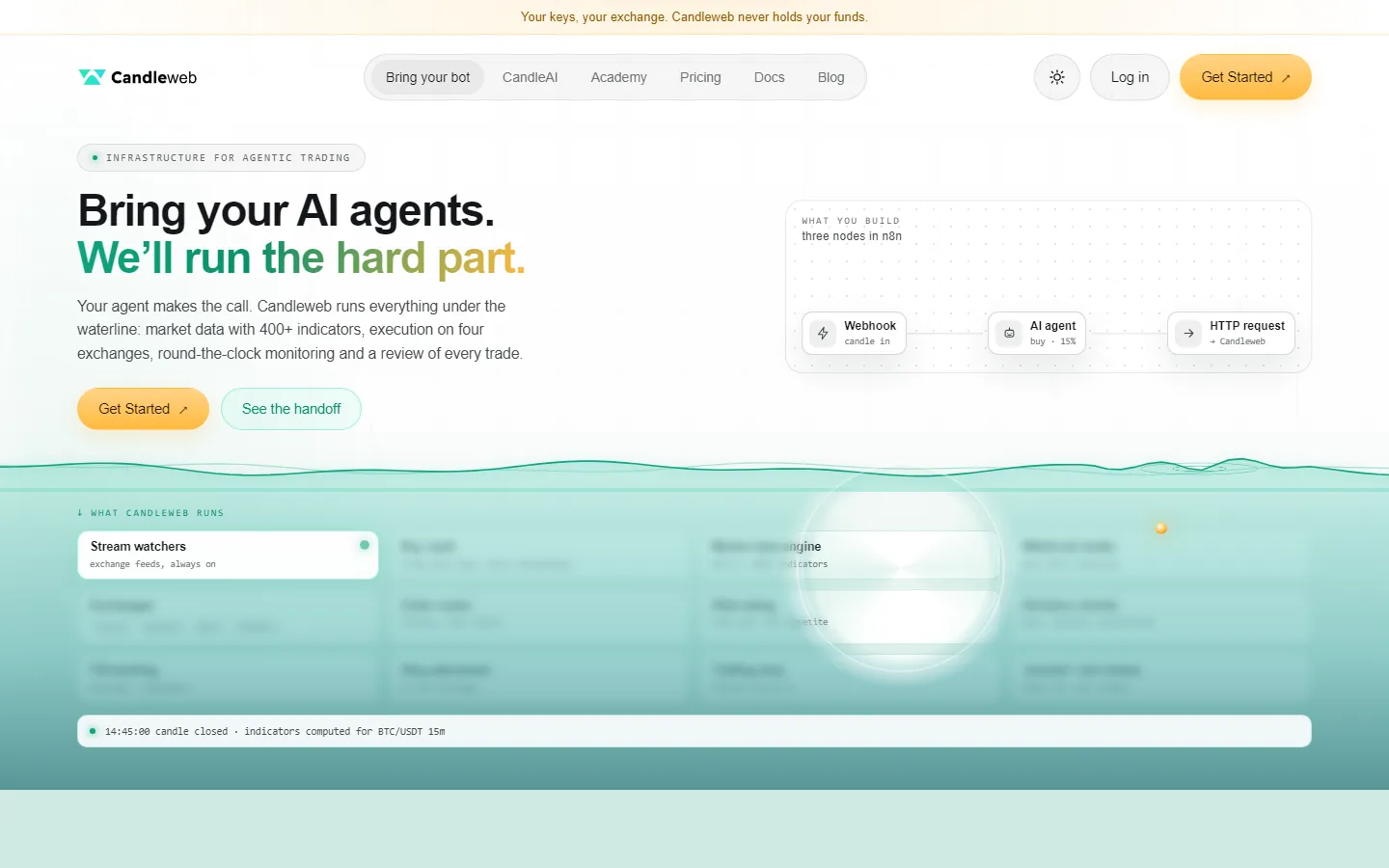
- 1The custody line
“Your keys, your exchange. Candleweb never holds your funds.” — above the logo, on every page.
- 2Three doors first
Bring your bot, CandleAI and Academy lead the navigation; Pricing, Docs and Blog follow.
- 3Statement, then payoff
The second line of the headline carries the green-to-gold gradient.
- 4What you build
Three nodes in n8n: a webhook, an AI agent, and an HTTP request to Candleweb.
- 5Under the waterline
Everything Candleweb runs sits below a teal waterline, and a glass lens brings each service into focus.
- 6The system narrates itself
A ticker reports the last candle close: “indicators computed for BTC/USDT 15m”.
Key screens
CandleAI — for everyone else
Three decisions and it’s running: pick a market, set your limits, switch it on. At every candle close it returns buy, sell or do nothing — mostly do nothing — with a sentence explaining why.
Risk per trade, a position ceiling, pause at any time, and every decision on the record: the four controls the page promises.
Pricing — same engine on every plan
A flat monthly fee in naira or crypto, and a 0.1% fee only on volume above what the plan includes. Paper is free with no card and no keys, Builder goes live on one exchange, Desk runs several strategies across every exchange.
A plan finder — how you trade, how many agents, how many exchanges, monthly volume — lights up the plan that fits before anyone pays.
Academy — learn, then build
Short, live, cohort-based programmes. The course in this capture pairs automation with n8n (an n8n Approved Curriculum) and personal finance, and ends with students building their own crypto trading bot.
Cohort fees include three months of the Builder plan, so a bot built in class can go straight onto a live market.
Docs — the setup guide
A step-by-step guide for bot builders, no coding needed: import the ready-made n8n template or build the workflow node by node, test it on a Demo trade, then switch it on.
The setup guide is also where the product’s rules are written down plainly. A bot can only ever give an opinion; what happens to it is decided here:
How Candleweb acts on a bot’s decision (Docs)
- Decision arrives
- Above minimum confidence? — The minimum is 50 unless the trade changes it; at 50, a 50 is held.
- BUY, SELL or HOLD?
- Open a position — Only if the risk is LOW or MEDIUM and no position is open on that market. Long-only; the stop and size come from the trade’s risk settings.
- Close the position — Only if “Let my bot’s SELL close the position” is on (off by default). A SELL never opens a short.
- On the decision timeline — Every decision is recorded, and Candleweb’s reply says what it did and why.
Build & handoff — the admin panel
Behind the product sits an internal admin panel, built front-end first from its Figma designs: a Next.js 16 app in a Turborepo monorepo, TypeScript and Tailwind 4, dark-only and desktop-first. There is no backend yet. Every value on every screen is a typed fixture, so the whole panel can be reviewed before an API exists.
Screens were built one reference screenshot at a time, in flow order — never invented from a Figma frame’s name. Every analytics screen groups its charts into titled bands with a one-line description, a rule the test suite enforces.
How each screen was built
- Figma frame
- Reference screenshot — Build only the screen whose screenshot has been supplied.
- Typed fixture — Figures are made to add up: the revenue screen’s five breakdowns each sum to the same total.
- Screen from shared parts — Panel cards, status badges, the sidebar, the top bar, one file per chart.
- E2E on a production build — Playwright runs against a production build, never the dev server, which proved flaky on chart-heavy routes.
- Changelog entry
what the panel covers
- Users — all users, segments, activity logs, and profiles with trade history, financials and referrals.
- Revenue — revenue management.
- Trading — trade analytics, a global trade feed, exchange management.
- Platform content — the Academy’s course catalogue, curriculum, cohorts, certificates, students and grading, and community tasks.
- Marketing — referrals, email campaigns, platform analytics.
- System — logs, admins and roles, the audit log, tool links, and the admin’s own account settings.
- Notifications — inbox, alerts and push, global notifications.
-
Setup and the login screen
The project audited, the monorepo set up, the Admin Portal Login built.
-
Trading section complete
Trade records, exchange management, the 404 screen and the Netlify deploy configuration.
-
Academy content
The curriculum section of Platform Content.
-
Figma file restructured
Moved to a new file and restructured: shared chrome, heights and naming.
-
Notifications
The admin’s inbox, alerts and push, and global notifications.
-
The control audit
A scan of every button, dropdown, filter and form found 134 items. First fix: 18 destructive dialogs that confirmed nothing — the confirm handler is now required, so a 19th can’t compile. Create/Save buttons that only closed their dialog followed.
Outcome & learnings
Candleweb is live at candleweb.io. The positioning has moved since the earliest description of the product — from an AI trading companion to infrastructure for people who build their own bots, with CandleAI as the door for everyone else and the Academy feeding new builders in. The custody promise has become more exact along the way: an exchange account and trade-only keys, not a wallet.
No usage or trading figures are published here, and none are claimed. The admin panel is built but runs on fixtures; it is not yet wired to an API.
open, from the admin panel’s own notes
- Wire the panel to a real API — after fixing three components that would print a loss in the profit colour.
- Finish the control audit: the dialogs are fixed, but 90 buttons still have no handler.
- AI Unit Purchases, the one sidebar route not yet built.
learnings
- Lead with the custody promise; every other claim on a trading product is read through it.
- Write the rules down where builders look. The docs’ decision table says exactly when a BUY is acted on — that does more for trust than a slogan.
- A dialog that looks deliberate but does nothing is worse than a missing button. Make the handler required and let the compiler find the rest.